Short videos & slideshows for TikTok, Reels and Shorts
Turn one idea into a ready-to-post short video or TikTok slideshow.
Type a topic. MakeShorty builds a captioned video with voice-over, footage and music, or a photo slideshow with a hook and text on every slide. Export in 1080×1920 and post.
First video and first slideshow free · No card needed
 TikTok
 Instagram Reels
 YouTube Shorts
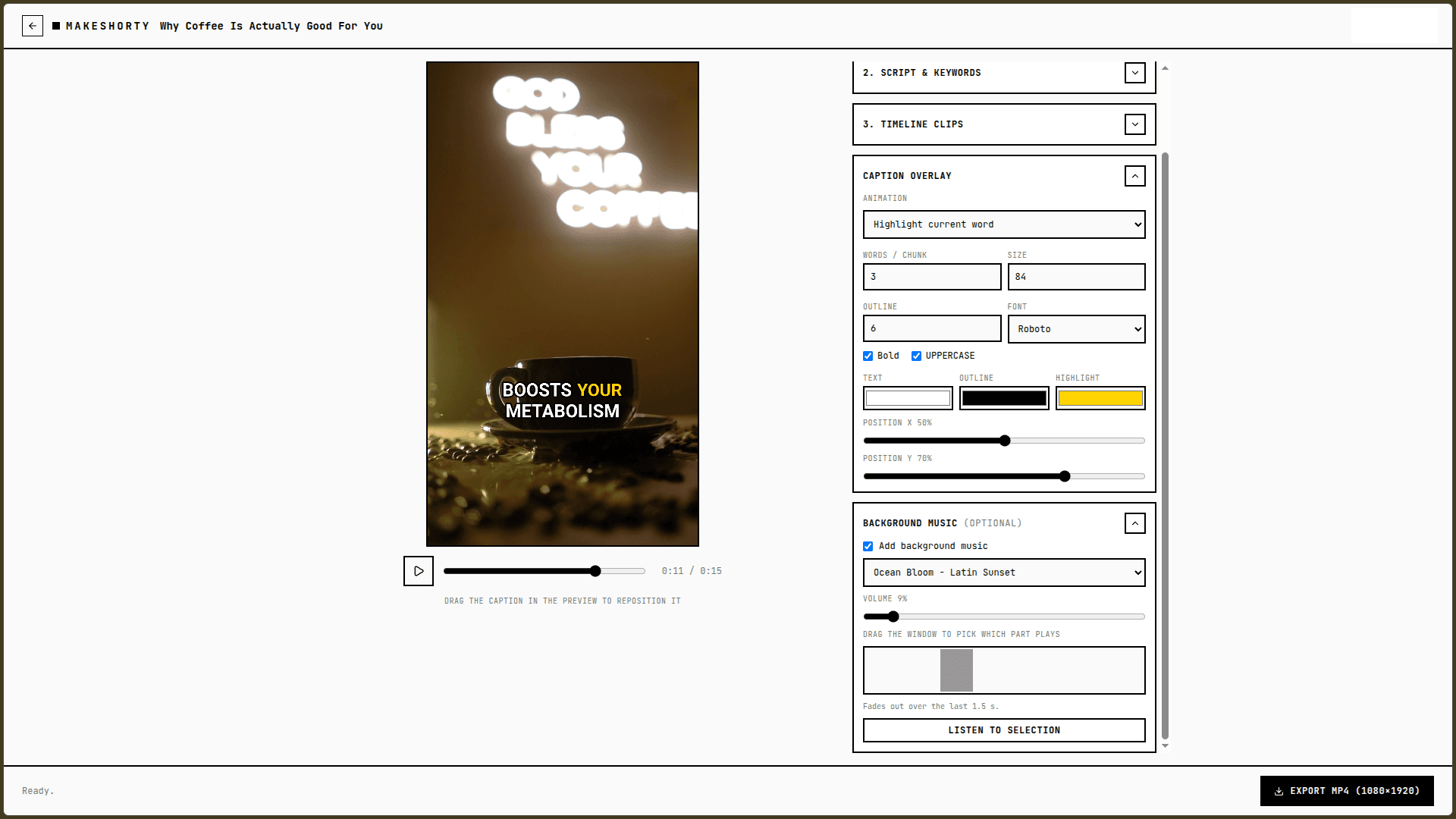
From “interesting fact about coffee” to an editable, captioned video
Short videos
A whole video team in one text box.
Script, voice-over, footage, captions and music, built from a single idea and editable end to end.
A script that hooks
Type a topic. MakeShorty writes a tight ~15 second script that opens with a hook and keeps the pace up.
A real voice-over
Pick a narrator voice and get natural narration recorded for you. No microphone, no retakes.
Footage that fits
Matching royalty-free stock clips are found and cut to the length of your narration. Swap, reorder or re-roll any of them.
Animated captions
Word-by-word highlighting, spring pops or static chunks. Choose the font, colors and size, then drag the captions into place.
Background music
Add a track, set the volume and drag a window to choose which part plays. It fades out at the end.
Export in your browser
Render a 1080×1920 MP4 right on your device and upload it to TikTok, Reels or Shorts.
TikTok slideshows
One idea. A swipeable slideshow.
MakeShorty finds matching photos and writes a hook plus text for every slide. Tweak it in the editor, then export 1080×1920 PNGs for TikTok photo mode and Instagram carousels.
Describe it. Get the slideshow.
Type your idea. MakeShorty finds matching photos and writes a hook plus text for every slide.
Batch a week of posts
Create posts in bulk from a count or a JSON list and fill your calendar in one sitting.
Tweak anything
Drag text, swap photos, change fonts and colors. The draft is a starting point, not a cage.
Export and post
Every slide downloads at 1080×1920, bundled into a single ZIP for TikTok photo mode.
How it works
Describe your idea
A topic is enough, like “interesting fact about coffee”. Sign in with Google: your first video and your first slideshow are free.
Watch it come together
For a video: script, voice-over, footage, captions and music. For a slideshow: photos, a hook and text on every slide. Both open in an editor.
Tweak and export
Edit anything, then export a 1080×1920 MP4 or a ZIP of PNG slides and post.
Post anywhere vertical
One idea. Three feeds.
TikTok
Vertical 9:16 MP4 videos with burned-in captions, or PNG slides for TikTok photo mode.
9:16 · 1080×1920 · MP4 / PNGInstagram Reels
Full-screen 1080×1920 Reels, or slides for a carousel, with no cropping or letterboxing.
9:16 · 1080×1920 · MP4 / PNGYouTube Shorts
Short, punchy and under a minute. Upload the MP4 straight to Shorts.
9:16 · 1080×1920 · MP4 / PNGIdeas that work great
- Interesting facts
- Quick tips
- Top 5 lists
- Product teasers
- Myth busters
- Mini stories
- How-to explainers
- Daily motivation
- Travel highlights
- Recipe ideas
Why not just ChatGPT?
ChatGPT writes the words. MakeShorty ships the post.
| ChatGPT | MakeShorty | |
|---|---|---|
| You get | Text to copy out | Finished 9:16 videos and slideshows |
| Photos & footage | You find and place them | Matched to your idea |
| Voice & captions | Recorded and added elsewhere | Narration and animated captions built in |
| Many posts | One chat at a time | Batch create slideshows (Pro & Max) |
| Export | Copy and paste | 1080×1920 MP4 or a ZIP of PNGs |
FAQ
Quick answers
Do I need video editing experience?
No. You type an idea and MakeShorty builds the whole video: script, voice-over, footage, captions and music. Everything stays editable if you want to fine-tune it.
Which platforms can I post the videos to?
Videos export as vertical 9:16 MP4 files at 1080×1920, which is the native format for TikTok, Instagram Reels and YouTube Shorts. You upload the file yourself, so you stay in control of your accounts.
How much does it cost?
Your first video and your first AI-built slideshow are free, with no card needed. After that, slideshows are available from the Standard plan, and video is included in Pro (1 video per day) and Max (3 videos per day).
Where does the video get rendered?
In your browser, on your own device, so there is no upload queue to wait in. A recent desktop version of Chrome or Edge works best.
Can I change the script, clips and captions afterwards?
Yes. Edit the script and re-record the voice, reorder or replace clips, restyle and reposition the captions, and add or remove background music, all with a live preview.
What is a TikTok slideshow and can MakeShorty make one?
Yes, it is one of the two things MakeShorty is built for. Describe your idea and it finds matching photos and writes a hook plus text for every slide. Drag, restyle and swap anything, then export all slides as 1080×1920 PNGs in one ZIP for TikTok photo mode or Instagram carousels.
First video and slideshow free
Make your first video or slideshow
in minutes.
No card needed · Plans from $7/mo after your free try